
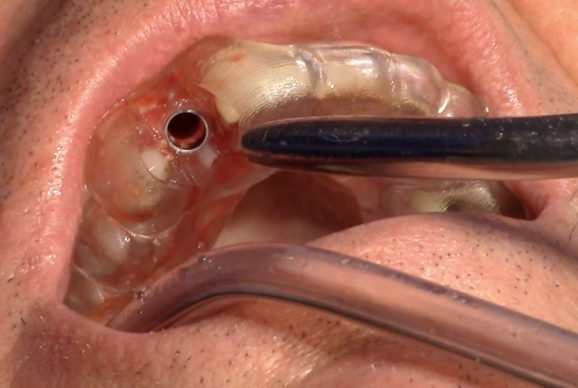
Digital planning has changed how many dentists place implants. Instead of relying only on adjacent teeth and experience to judge position, angle and depth, the implant can be planned on a CBCT scan around the final restoration and then transferred to the mouth. There are two main ways of doing that transfer: static guides and dynamic navigation. This article explains the difference, and where each fits for a general dentist building an implant practice.
Start with a restoratively driven plan
Whichever technique you use, guided surgery is only as good as the plan behind it. The workflow usually starts with a CBCT scan and an intraoral or model scan, which are merged in planning software such as Nobel Biocare’s DTX Studio Implant. The ideal tooth position is set first, and the implant is then planned to support it while respecting the available bone, the nerve, the sinus and neighbouring roots. Learning to read CBCT data and plan from the crown down is the foundation for everything that follows.
Static guided surgery: 3D-printed surgical guides
With static guidance, the plan is turned into a surgical template – usually 3D printed – containing sleeves that direct the drills. The guide may be tooth-supported, mucosa-supported or bone-supported.
- Strengths: predictable transfer of the plan, well suited to flapless surgery, and relatively low equipment cost if you already have access to CBCT and a printer or lab.
- Limitations: the guide must be designed and made before surgery, it needs adequate mouth opening, it can restrict irrigation and your view of the site, and the plan cannot easily be changed once you have started.
Dynamic navigation: X-Guide
Dynamic navigation tracks the patient and the handpiece with cameras and shows the drill’s position, angle and depth against the plan on a screen in real time – often described as “GPS for implant drills”. X-Guide, developed by X-Nav Technologies and distributed by Nobel Biocare, is the system we teach. After registration, you operate freehand while following the on-screen target, so there is no template in the mouth.
- Strengths: no guide to design or wait for, so a patient can be scanned, planned and treated on the same day; a clear view of the surgical site and good irrigation; the plan can be adjusted during surgery; and it is useful where a guide would not fit, such as limited mouth opening or posterior sites.
- Limitations: higher equipment cost, extra set-up and calibration time, and a learning curve – you need to learn to look at the screen rather than the mouth while drilling.
In this video Dr David Guy introduces X-Guide and shows how it is used in practice:
Which should you learn first?
Neither technology replaces surgical skill. You still need to understand the anatomy, handle soft tissue and bone, recognise when the plan and the clinical picture do not match, and manage complications. For that reason we recommend learning conventional implant surgery first, with digital planning built in from the start, and then adding guided and navigated techniques once you are placing straightforward implants confidently.
That is the order our courses follow. The Certificate in Implant Dentistry covers planning, surgery and restoration of straightforward cases. The Certificate in Advanced Implant Dentistry opens with two days on guided surgery – DTX digital planning, CBCT-based implant positioning, 3D-printed surgical guides and flapless surgery – and finishes with two days on X-Guide dynamic navigation, including going from CT scan to surgery in one visit. Each delegate on the Advanced course receives a 6-month licence for DTX Implant Studio, and the group is limited to eight.
New to implants? Start with our guide to choosing a dental implant course in the UK.